

PRODUCTIVITY - NO CODE







How to Build, Automate, and Scale Without Writing Code
In the past, building digital products, automating workflows, or launching an online business required technical skills and programming knowledge. Today, that is no longer the case.
Thanks to the rise of no-code tools, entrepreneurs, marketers, and small businesses can now create websites, automate processes, manage data, and build entire systems—without writing a single line of code.
No-code technology has completely transformed productivity. It allows individuals and teams to move faster, reduce costs, and focus on what really matters: growing their business.
In this guide, we will explore:
- what no-code productivity really means
- why no-code tools are changing online business
- the types of no-code tools available
- how to use no-code for automation and growth
- the best no-code tools for entrepreneurs
If you want to work smarter, build faster, and scale your business efficiently, no-code is one of the most powerful approaches you can adopt.
What Is No-Code?
No-code refers to tools and platforms that allow users to build applications, websites, workflows, and systems using visual interfaces instead of programming languages.
Instead of writing code, users interact with:
- drag-and-drop builders
- visual editors
- automation rules
- pre-built templates
These tools simplify complex processes and make technology accessible to non-developers. For example, instead of hiring a developer to create a landing page, you can use a platform like ClickFunnels to design and launch high-converting pages in just a few hours.
Why No-Code Is Revolutionizing Productivity
No-code tools are not just about convenience—they fundamentally change how businesses operate.
Speed and Efficiency
No-code tools dramatically reduce the time needed to build and launch projects.
Tasks that once required weeks of development can now be completed in hours or days.
Lower Costs
Hiring developers or agencies can be expensive. No-code platforms allow entrepreneurs to build and manage systems independently, reducing operational costs.
Accessibility
No-code tools empower non-technical users to create and manage digital products.
This opens the door for:
- entrepreneurs
- freelancers
- marketers
- small business owners
to innovate without technical barriers.
Flexibility and Experimentation
With no-code tools, it is easier to test ideas quickly.
You can:
- launch a landing page
- test a marketing funnel
- build a prototype
without committing significant resources.
Types of No-Code Tools for Productivity
No-code tools cover a wide range of functions. Understanding these categories helps you choose the right tools for your needs.
Website and Funnel Builders
These tools allow you to create websites, landing pages, and sales funnels. ClickFunnels is one of the most popular platforms in this category. It enables users to build complete marketing funnels that capture leads, nurture prospects, and convert visitors into customers.
Key features include:
- drag-and-drop page builder
- pre-designed templates
- email automation
- sales funnel creation
These tools are essential for entrepreneurs who want to generate leads and revenue online.
Workflow Automation Tools
Automation tools connect different apps and automate repetitive tasks.
They allow users to create workflows such as:
- sending emails when a form is submitted
- updating databases automatically
- triggering actions across multiple platforms
These tools improve productivity by eliminating manual processes.
Database and App Builders
No-code platforms can also be used to create custom databases and applications.
These tools allow users to:
- manage data
- build internal tools
- create dashboards
- track projects
They are especially useful for businesses that need custom solutions without hiring developers.
Project Management Tools
Many project management platforms now include no-code automation features.
These tools help teams:
- organize tasks
- assign responsibilities
- track deadlines
- automate workflows
This improves collaboration and ensures projects stay on track.
CRM and Customer Management Tools
CRM platforms like Zoho CRM allow businesses to manage customer relationships, track leads, and automate communication.
By integrating CRM systems with no-code automation tools, businesses can create powerful workflows that improve customer engagement and sales performance.
How No-Code Improves Business Productivity
No-code tools enable businesses to operate more efficiently by automating tasks and simplifying processes.
Automating Repetitive Tasks
Repetitive tasks such as data entry, email follow-ups, and reporting can consume significant time.
No-code automation allows these tasks to run automatically, freeing up time for more strategic work.
Streamlining Communication
No-code tools can automate communication between teams and customers.
For example:
- sending notifications when tasks are completed
- updating team members on project progress
- delivering automated customer messages
Building Systems Instead of Tasks
Instead of handling tasks individually, no-code tools allow you to build systems that operate continuously.
For example, a marketing system might include:
- A landing page created with ClickFunnels
- An email sequence that nurtures leads
- A CRM system that tracks interactions
- Automated follow-ups that guide users toward a purchase
Once built, the system runs automatically.
No-Code and Automation: A Perfect Combination
No-code tools and automation go hand in hand.
Together, they allow businesses to:
- connect multiple tools
- automate workflows
- reduce manual work
- improve efficiency
For example, you could create a workflow where:
- A user fills out a form
- Their data is stored in a CRM
- An email sequence is triggered
- A task is assigned to your team
All of this happens automatically without manual intervention.
Benefits of No-Code for Entrepreneurs
Entrepreneurs benefit greatly from no-code tools because they allow for rapid execution and flexibility.
Faster Business Launch
No-code tools allow entrepreneurs to launch websites, products, and marketing campaigns quickly.
Reduced Dependence on Developers
Business owners can build and manage systems independently, reducing reliance on technical teams.
Improved Focus
By automating routine tasks, entrepreneurs can focus on strategy, growth, and innovation.
Scalability
No-code systems can grow alongside the business, supporting increased demand and complexity.
Project and Workflow Tools
Project management and workflow tools help teams organize tasks and automate processes.
These platforms improve collaboration and ensure efficient project execution.
Best No-Code Tools for Online Businesses
🏆 Recommended No-Code Platforms
There are many no-code tools available, each designed for different purposes.
🥇 ClickFunnels – Build Funnels That Convert
If your goal is to turn traffic into leads and sales, ClickFunnels is one of the most powerful no-code tools available.
- Create landing pages without coding
- Build complete sales funnels
- Capture leads and automate follow-ups
- Increase conversions with proven templates
👉 Best for: Entrepreneurs, affiliate marketers, and online businesses focused on revenue generation
✅ Start Using ClickFunnels
⚡ Zoho CRM – Automate Customer Relationships
Zoho CRM is ideal for managing leads, automating communication, and scaling your sales processes.
- Track and manage leads
- Automate workflows and follow-ups
- Analyze performance with detailed reports
- Integrate with the full Zoho ecosystem
👉 Best for: Growing businesses that need structured customer management
✅ Start Using Zoho CRM
🔗 Zapier – Connect Everything Automatically
Zapier allows you to connect apps and automate repetitive tasks without coding.
- Automate workflows between tools
- Save time on repetitive tasks
- Connect hundreds of applications
👉 Best for: Automating processes across multiple platforms
✅ Find out more about Zapier
🧠 Notion – Organize Your Entire Business
Notion is a flexible workspace that combines notes, tasks, and databases in one platform.
- Manage projects and tasks
- Create documentation and workflows
- Build internal systems
👉 Best for: Personal productivity and team organization
📊 Airtable – Powerful No-Code Database
Airtable combines the simplicity of spreadsheets with the power of databases.
- Organize and manage data visually
- Build custom workflows
- Track projects and operations
👉 Best for: Data management and custom workflows. However, for many small businesses and entrepreneurs, simpler tools like Notion or more automation-focused platforms can often provide a more practical and streamlined solution depending on specific needs.
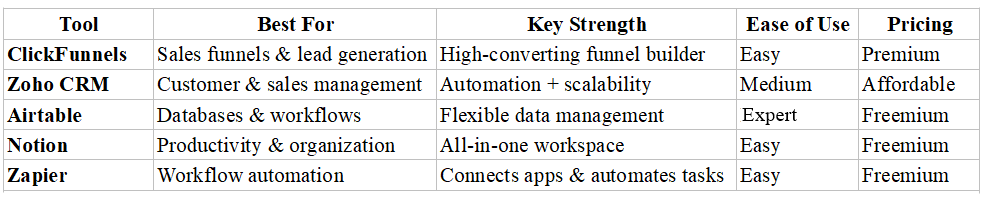
No-Code Tools Comparison
💡 How to Choose the Right No-Code Tool
The best no-code tool depends on your business goals:
- Want to generate leads and sales? → ClickFunnels
- Need to manage customers and pipelines? → Zoho CRM
- Looking to automate workflows? → Zapier
- Need organization and planning? → Notion
- Managing data and systems? → Airtable
🔥 Pro Tip for Maximum Productivity
The real power of no-code tools comes from combining them into one system.
For example:
- Build a funnel with ClickFunnels
- Capture leads into Zoho CRM
- Automate workflows using Zapier
- Manage tasks in Notion
This creates a fully automated business system that runs efficiently with minimal manual work.
Common Mistakes to Avoid with No-Code
While no-code tools offer many advantages, there are some common mistakes to avoid.
Overcomplicating Workflows
It is easy to create overly complex systems.
Start simple and gradually build more advanced workflows as needed.
Ignoring Integration
No-code tools are most powerful when they work together.
Ensure your tools integrate well to avoid fragmented systems.
Lack of Planning
Automation requires clear processes.
Before building workflows, define each step carefully.
The Future of No-Code Productivity
No-code technology continues to evolve rapidly, especially with the integration of artificial intelligence.
Future developments may include:
- smarter automation systems
- AI-powered workflow optimization
- more advanced integrations between platforms
As these technologies improve, no-code tools will become even more powerful and accessible.
Final Thoughts
No-code tools have transformed the way businesses operate by making technology accessible to everyone. By using no-code platforms, entrepreneurs can build systems, automate processes, and scale their businesses without technical barriers. Tools like ClickFunnels and Zoho CRM demonstrate how powerful no-code solutions can streamline marketing, sales, and customer management.
👉 For anyone looking to improve productivity, reduce manual work, and grow an online business, no-code is not just an option—it is a competitive advantage.